Building a Custom Polls Feature in Umbraco 17 Backoffice
A complete, modern walkthrough for extending the new backoffice
Umbraco 17 introduces a refreshed backoffice architecture that makes it easier — and far more enjoyable — to build rich, native‑feeling tools directly inside the CMS. To put those capabilities to work, this guide walks through the full implementation of a Polls feature: a custom section, workspace, views, drag‑and‑drop answer sorting, a property picker, and a clean API boundary.
If you’re exploring how to build extensions in the new backoffice, this is a great real‑world example to learn from.
Getting Started
Your first steps into building Umbraco 17 backoffice extensions
If you’re new to Umbraco 17’s extension model, don’t worry — you don’t need to understand everything at once. This guide is designed so you can follow along step‑by‑step, even if this is your very first custom workspace or web component.
Once you’re set up, the journey looks like this:
Create a manifest
This is the “index” of your extension — it tells Umbraco what you’re adding.Add a workspace
This becomes the home for all your Polls views.Build your views
Start simple: an overview page, an editor page, and a results page.Enhance the UI with custom elements
This is where the drag‑and‑drop answer sorter comes in.Add a property picker
So editors can select polls inside content.Connect to your API
A small TypeScript client keeps your views clean and maintainable.Render polls on the frontend
A ViewComponent + BlockGrid template brings everything to life.
You don’t need to master all of this upfront. Each piece builds on the last, and by the end you’ll have a fully working feature — plus a solid understanding of how Umbraco’s new backoffice fits together.
1. Architectural Overview
The Polls feature is built as a modular backoffice extension. Each part has a clear responsibility, making the system easy to maintain and extend.
Core components
Component | Responsibility |
|---|---|
Sidebar App + Menu Tree | Adds a Polls entry under Settings |
Workspace | Provides routing and a consistent UI shell |
Views | Overview, Authoring, and Results |
Custom Elements | Drag‑and‑drop answer sorting |
Property Picker | Allows editors to select a poll in content |
API Client | Encapsulates communication with backend endpoints |
Frontend Rendering | Displays polls on the public website |
This modular structure aligns with Umbraco 17’s recommended extension patterns and keeps the feature maintainable as it grows.


While none of the articles/blogs or documentation provided exactly what I needed, the following links were very helpful.
2. Extension Entry Point
Every backoffice extension begins with a manifest file umbraco-package.json and/or bundle.manifest.ts). This is where you declare:
your workspace
your views
your custom elements
your property editors
your sidebar apps
Think of it as the “table of contents” for your extension. Umbraco reads this file and wires everything together.
// umbraco-package.json
{
  "id": "MediaWizPolls",
  "name": "MediaWizPolls",
  "version": "17.0.0",
  "allowTelemetry": true,
  "extensions": [
    {
      "name": "Our Community Polls Bundle",
      "alias": "MediaWizPolls.Bundle",
      "type": "bundle",
      "js": "/App_Plugins/OurCommunityPolls/our-community-polls.js"
    }
  ]
}
//bundle.manifest.ts
import { manifests as entrypoints } from "./entrypoints/manifest.js";
import { manifests as sidebar } from "./settingsTree/manifest.js";
import { manifests as workspaces } from "./workspace/manifest.js";
import { manifests as pickers } from "./picker/manifest.js";
import { manifests as actions } from "./settingsTree/entityActions/manifest.js";
// Job of the bundle is to collate all the manifests from different parts of the extension and load other manifests
// We load this bundle from umbraco-package.json
export const manifests: Array<UmbExtensionManifest> = [...entrypoints, ...sidebar, ...actions,...workspaces,...pickers];
3. SidebarApp and Menu Tree
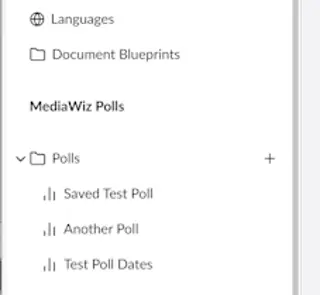
The Polls feature appears in the Settings section thanks to a custom SidebarApp and MenuTree.
The manifest in settingsTree/manifest.ts defines:
the SidebarApp
the MenuTree
navigation items
This gives editors a familiar, Umbraco‑native way to browse and manage polls.
// settingsTree/manifest.ts
import {
    POLL_TREE_ITEM_ENTITY_TYPE,
    POLL_TREE_ROOT_ENTITY_TYPE,
} from "./types.js";


const repositoryManifest: UmbExtensionManifest = {
    type: "repository",
    alias: "Polls.Tree.Repository",
    name: "UmbRepositorySettings",
    api: () => import("./polltree.repository.js")
};

const storeManifest: UmbExtensionManifest = {
    type: "treeStore",
    alias: "Polls.Tree.Store",
    name: "UmbTreeSettingsStore",
    api: () => import("./polltree.store.js")
};

const treeManifest: UmbExtensionManifest = {
    type: "tree",
    kind: "default",
    alias: "Polls.Tree.Tree",
    name: "UmbTreeSettings",
    meta: {
        repositoryAlias: repositoryManifest.alias,
    }
};

const treeItem = {
    type: "treeItem",
    kind: "default",
    alias: "Polls.Tree.Item",
    name: "UmbTreeSettingsItem",
    meta: {
        hideActions: false
    },
    forEntityTypes: [POLL_TREE_ROOT_ENTITY_TYPE, POLL_TREE_ITEM_ENTITY_TYPE]
};

const menuManifest: UmbExtensionManifest = {
    type: "menu",
    alias: "Polls.Tree.Menu",
    name: "Polls Menu",
    meta: {
        label: "Polls",
        icon: "icon-bar-chart",
        entityType: POLL_TREE_ITEM_ENTITY_TYPE,
    }
};

const sidebarAppManifest: UmbExtensionManifest = {
    type: "sectionSidebarApp",
    kind: "menu",
    alias: "Polls.Tree.Sidebar",
    name: "Polls Sidebar",
    weight: 300,
    meta: {
        label: "MediaWiz Polls",
        menu: menuManifest.alias,
    },
    conditions: [
        {
            alias: "Umb.Condition.SectionAlias",
            match: "Umb.Section.Settings",
        },
    ]
};
const menuitemManifest: UmbExtensionManifest = {
    type: "menuItem",
    kind: "tree",
    alias: "Polls.Tree.MenuItem",
    name: "Polls Menu Item",
    weight: 100,
    meta: {
        label: "Polls Item",
        icon: "icon-bug",
        entityType: POLL_TREE_ITEM_ENTITY_TYPE,
        menus: [menuManifest.alias],
        treeAlias: treeManifest.alias,
        hideTreeRoot: false,
    },

};


export const manifests: Array<UmbExtensionManifest> = [
    repositoryManifest,
    treeManifest,
    storeManifest,
    sidebarAppManifest,
    treeItem,
    menuManifest,
    menuitemManifest,

];
This manifest defines the SideBarApp and the Menu structure etc.
3.1 Menu Tree
What's a Tree,
A tree is a hierarchical collection of items, that is displayed in a folder like structure to the user. Its a piece of UI that allows the user to drill down into the polls that have been created.
Components of the tree.
In Umbraco a tree is made up of several parts. And we will step through each of them
Menu
The menu is the "container" that the tree will live in. it is defined by a manifest, and has no code behind that.Menu Item
The menu item is the placeholder for where the tree lives, again defined in a manifest file it tells Umbraco where the tree is, what types of items it manages etc.
Tree
The "Tree" tells Umbraco about the tree, specifically it tells Umbraco where to get your repository from that goes and gets the tree items.
Tree Repository
The repository is where the code lives to fetch the tree items, it will interact with your Store, and ultimitly the API layer to go get your tree items.
Tree Store
The store is the part that talks to the API to get tree items, it has two main methods which are getRoot and getChildren these get the items for your tree.
Models
The Models that you pass between the front end and back end define what information is set on your tree, If we want to piggy back on some of Umbraco's exiting tree info (and we do!) then we need to have these models setup in a certain way.
4. Workspace and Views
The workspace is the heart of the Polls UI. It controls routing and provides a consistent shell for all views.
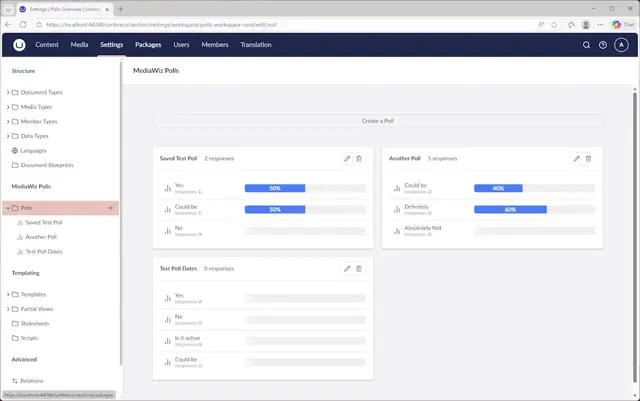
The manifest in workspace/manifest.ts registers the workspace and its views.
import { type ManifestWorkspace, type ManifestWorkspaceView, UMB_WORKSPACE_CONDITION_ALIAS } from "@umbraco-cms/backoffice/workspace";
import {
    POLL_TREE_ITEM_ENTITY_TYPE,
    POLL_TREE_ROOT_ENTITY_TYPE,
} from "../settingsTree/types.js";
import PollsWorkspaceContext from "../workspace/polls-workspace-context.js";
import PollsRootContext from "./polls-root-context.js";

const workspace: ManifestWorkspace = {
    type: 'workspace',
    kind: 'routable',
    alias: 'polls.Workspace',
    name: 'Polls Workspace',
    api: PollsWorkspaceContext,
    meta: {
        entityType: POLL_TREE_ITEM_ENTITY_TYPE,
    }
}
const responsesWorkspace: ManifestWorkspace =
{
    type: 'workspace',
    kind: 'routable',
    alias: 'polls.Root',
    name: 'Polls Summary',
    api: PollsRootContext,
    meta: {
        entityType: POLL_TREE_ROOT_ENTITY_TYPE,
    }
};
const workspaceView: ManifestWorkspaceView =
{
    type: 'workspaceView',
    name: 'default View',
    alias: 'polls.workspace',
    js: () => import('./polls-workspace.js'),
    weight: 900,
    meta: {
        label: 'Content',
        pathname: 'edit',
        icon: 'icon-bar-chart',
    },
    conditions: [
        {
            alias: UMB_WORKSPACE_CONDITION_ALIAS,
            match: 'polls.Workspace',
        },
    ]
};
const overView: ManifestWorkspaceView =
{
    type: 'workspaceView',
    name: 'over View',
    alias: 'polls.overview',
    js: () => import('./polls-responses.js'),
    weight: 900,
    meta: {
        label: 'Responses',
        pathname: 'overview',
        icon: 'icon-chart',
    },
    conditions: [
        {
            alias: UMB_WORKSPACE_CONDITION_ALIAS,
            match: workspace.alias,
        }
    ]
};
const responseView: ManifestWorkspaceView =
{
    type: 'workspaceView',
    name: 'response View',
    alias: 'polls.root',
    js: () => import('./polls-overview.js'),
    weight: 100,
    meta: {
        label: 'Polls Overview',
        pathname: 'poll',
        icon: 'icon-lab',
    },
    conditions: [
        {
            alias: UMB_WORKSPACE_CONDITION_ALIAS,
            match: 'polls.Root',
        },
    ]
};


export const manifests: Array<UmbExtensionManifest> = [
    workspace,
    workspaceView,
    responsesWorkspace,
    responseView,
    overView,
];
4.1 Overview View
File: workspace/polls-overview.ts
A simple dashboard‑style view listing all polls with actions to:
edit
delete
import { UMB_WORKSPACE_CONTEXT } from "@umbraco-cms/backoffice/workspace";
import { UmbTextStyles } from '@umbraco-cms/backoffice/style';
import { css, html, customElement, LitElement, state, repeat } from '@umbraco-cms/backoffice/external/lit';
import { UmbElementMixin } from '@umbraco-cms/backoffice/element-api';
import { umbConfirmModal } from '@umbraco-cms/backoffice/modal';
import { POLLS_ROOT_CONTEXT } from "./polls-root-context";
import { PollQuestionService } from "../models/poll-questionservice";

@customElement('polls-overview')
export class PollsOverviewView extends UmbElementMixin(LitElement) {
    @state()
    text?: string = '';
    pollid?: string | null = '';
    workspaceAlias: string = 'polls-overview';

    @state()
    private _polls: any;

    constructor() {
        super();
        this.provideContext(UMB_WORKSPACE_CONTEXT, this);
        this.consumeContext(POLLS_ROOT_CONTEXT, () => {
            this.requestUpdate();
        })
    }

    getEntityType(): string {
        return "polls-overview";
    }

    render() {
        this.fetchPolls().then(data => {
            this._polls = data;
        });
        if (!this._polls) {
            return html`
                <umb-body-layout header-transparent header-fit-height>
                    <section id="settings-dashboard" class="uui-text">
                    <uui-button label="Edit" look="placeholder" pristine="" href="/umbraco/section/settings/workspace/polls-workspace-view/edit/-1" target="_self">Create a Poll</uui-button>
                    </section>
                </umb-body-layout>
            `;
        }
        return html`
        <umb-body-layout header-transparent header-fit-height>
            <section id="settings-dashboard" class="uui-text">
                <uui-button label="Edit" look="placeholder" pristine="" href="/umbraco/section/settings/workspace/polls-workspace-view/edit/-1" target="_self">Create a Poll</uui-button>
            </section>
            <section id="polls-dashboard" class="uui-text">
            ${repeat(this._polls, (item: any) => item.key, (item) =>
                html`<uui-box headline="${item.name}" >
                        <uui-action-bar slot="header-actions">
                            <uui-button label="Edit" look="placeholder" pristine="" href="/umbraco/section/settings/workspace/polls-workspace-view/edit/${item.id}" target="_self"><uui-icon name="edit"></uui-icon></uui-button>
                            <uui-button label="Delete"  look="placeholder" pristine="" @click="${(u: { preventDefault: () => void; target: any; }) => {
                                u.preventDefault();
                                this.#handleDelete(u);
                                }}" ><uui-icon name="delete" data-id="${item.id}"></uui-icon>
                            </uui-button>
                        </uui-action-bar>
                        <uui-ref-list>
                            ${repeat(item.answers.sort((a: any, b: any) => Number(a.index) - Number(b.index)), (answer: any) => answer.key, (answer) =>
                                html`
                                    <uui-ref-node name="${answer.value}" detail="(responses ${answer.responses.length})">
                                        <uui-icon slot="icon" name="icon-bar-chart"></uui-icon>
                                        <uui-label class="progress-bar" role="progressbar" aria - valuenow="${answer.percentage}" aria - valuemin="0" aria - valuemax="100">
                                            <div class="progress" style="width:${answer.percentage}%"><span class="progress-text">${answer.percentage}%</span></div>
                                        </uui-label>
                                    </uui-ref-node>`
                            )}
                        </uui-ref-list>
                        <span slot="header">
                            ${item.responseCount ?? 'Unknown'} responses
                        </span>
                    </uui-box>
                `)}
            </section>
        </umb-body-layout>`;
    }

    static override styles = [
        UmbTextStyles,
        css`
      :host {
        display: block;
        padding: var(--uui-size-layout-1);
      }
      #polls-dashboard{
        display: grid;
        grid-gap: var(--uui-size-7);
        grid-template-columns: repeat(2, 1fr);
        padding: var(--uui-size-layout-1);
      }
            #settings-dashboard{
        display: grid;
        grid-gap: var(--uui-size-7);
        grid-template-columns: repeat(1, 1fr);
        padding: var(--uui-size-layout-1);
      }
.progress-bar {
    width: 60%;
    max-width: 300px;
    height: 20px;
    background-color: #f0f0f0;
    border-radius: 5px;
    overflow: hidden;
}

.progress {
    height: 100%;
    background-color: #007BFF;
    width: 50%; /* This represents the percentage filled */
}
.progress-text {
    color: white;
    text-align: center;
    display: block;
}
    `,
    ];

    private async fetchPolls() {
        const poll = await PollQuestionService.GetOverview();
        return Promise.resolve(poll);

    }

    async #handleDelete(u: { target: any }) {
        const dataId = u.target?.dataset?.id;

        umbConfirmModal(this, { headline: 'Delete Poll', color: 'danger', content: 'Are you sure you want to delete?' })
            .then(async () => {
                const poll = await PollQuestionService.Delete(dataId);
                if (poll) {
                    return Promise.resolve(poll);
                } else {
                    return Promise.reject(new Error(`No polls found`))
                }

            })
            .catch(() => {
                return Promise.resolve('cancel');
            })

    }
}

export default PollsOverviewView;

declare global {
    interface HTMLElementTagNameMap {
        'polls-overview': PollsOverviewView;
    }
}
4.2 Authoring View
File: workspace/polls-workspace.ts
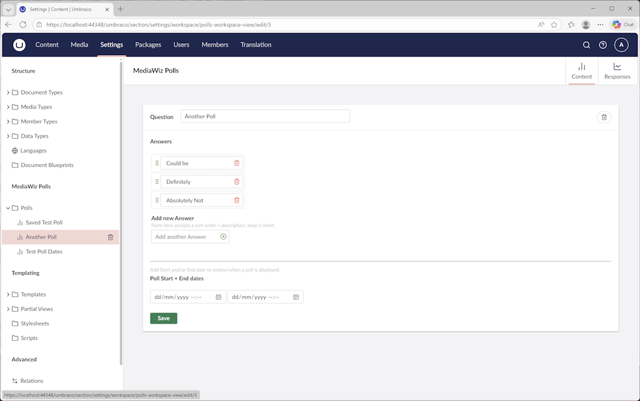
This is where editors create and edit polls. It includes:
question text
answer fields
the drag‑and‑drop sorter
view results
It demonstrates how custom elements integrate cleanly with Umbraco’s form system.
import { UMB_WORKSPACE_CONTEXT } from "@umbraco-cms/backoffice/workspace";
import { UmbTextStyles } from '@umbraco-cms/backoffice/style';
import { css, html, customElement, LitElement, state, query } from '@umbraco-cms/backoffice/external/lit';
import { UmbElementMixin } from '@umbraco-cms/backoffice/element-api';
import { POLLS_WORKSPACE_CONTEXT } from "./polls-workspace-context.js";
import { umbConfirmModal } from '@umbraco-cms/backoffice/modal';
import '../sorter/sorter-group.js';
import { PollQuestionService } from "../models/poll-questionservice.js";

@customElement('polls-workspace-view')

export class PollsWorkspaceView extends UmbElementMixin(LitElement) {
    @state()
    text?: string = '';
    @state()
    private _answers: any;
    @state()
    private _poll: any;

    pollid?: string | null = '';
    workspaceAlias: string = 'polls-workspace';

    @query('#answer-new-sort')
    newSortInp!: HTMLInputElement;
    @query('#answer-new-value')
    newValueInp!: HTMLInputElement;

    constructor() {
        super();
        this.provideContext(UMB_WORKSPACE_CONTEXT, this);
        this.consumeContext(POLLS_WORKSPACE_CONTEXT, (context) => {
            context?.pollId.subscribe((pollId: string | null | undefined) => {
                this.pollid = pollId;
            })
        })
    }

    getEntityType(): string {
        return "polls-workspace-view";
    }

    renderPollAnswers() {
        if (this.pollid == "-1") {
            return html`
            <uui-form-layout-item>
                <uui-label slot="label" required>You must save the question before adding answers</uui-label>
            </uui-form-layout-item>
            `;
        }
        if (this._answers?.length === 0) {
            return html`
            <uui-form-layout-item>
                <uui-label slot="label" required>No Answers defined</uui-label>
            </uui-form-layout-item>
            <uui-form-layout-item>
                <uui-label slot="label">Add new Answer</uui-label>
                <span slot="description">
                    Form item accepts a sort order + description, keep it short.
                </span>
                <uui-input id="answer-new-sort" pristine="" title="Sort Order" type="number" label="label" step="1" value="10" min="0" max="10"></uui-input>
                <uui-input id="answer-new-value" name="Answers" type="text" label="label"  pristine="" value="" placeholder="Add another Answer">
                    <div slot="append"  >
                        <uui-icon name="icon-badge-add" @click="${this.#addAnswer}"></uui-icon>
                    </div>
                </uui-input>
            </uui-form-layout-item>
            `;
        }
        return html`
			<uui-form-layout-item>
				<polls-sorter-group .items=${(this._answers ?? []).map((a: any) => ({
                    sortid: crypto.randomUUID(),
                    id: a.id,
                    sort: Number(a.index),
                    name: a.value,
                    question: a.questionId
                })) }></polls-sorter-group>
			</uui-form-layout-item>
            <uui-form-layout-item>
            <hr>
            </uui-form-layout-item>

            `;
    }

    override render() {

       this.fetchPoll(Number(this.pollid)).then(data => {
            if (!this._answers) {
                this._answers = data.answers;
                this._answers.sort((a: any, b: any) => Number(a.index) - Number(b.index));
            }
            this._poll = data;
       });
        if (!this._poll) {
            return html``;
        }
        return html`
        <umb-body-layout header-transparent header-fit-height>
            <section id="settings-dashboard" class="uui-text">
                <uui-form>
                <form id="MyForm" name="myForm"
                    @submit="${(u: { preventDefault: () => void; target: any; }) => {
                        u.preventDefault();
                        this.#handleSave(u).then((result) => {
                            let currentURL = window.location.href;
                            if (currentURL.endsWith("/-1")) {
                                let id: string | undefined;

                                // Try to parse result as JSON and get id property
                                try {
                                    const parsed = typeof result === 'string' ? JSON.parse(result) : result;
                                    id = parsed?.id;
                                } catch {
                                    // If result is not JSON, id remains undefined
                                }

                                if (id) {
                                    location.href = currentURL.replace("-1", id);
                                }
                            } else {
                                location.reload();
                            }

                        });

                    }}">
                    <uui-box headline="Question">
                        <div slot="header">
                            <uui-input style="--auto-width-text-margin-right: 50px;width:30em;" autowidth="" id="Question_${this._poll.id}" name="Name" type="text" label="Question" required="" pristine="" value="${this._poll.name}"></uui-input>
                        </div>
                        <uui-action-bar slot="header-actions">
                            <uui-button label="Delete"  look="placeholder" pristine="" @click="${(u: { preventDefault: () => void; target: any; }) => {
                                u.preventDefault();
                                this.#handleDelete(u);
                            }}" ><uui-icon name="delete" data-id="${this._poll.id}"></uui-icon>
                            </uui-button>
                        </uui-action-bar>

                        <uui-input id="qid" name="Id" type="number" label="Id" pristine="" value="${this._poll.id}" style="display:none;"></uui-input>
                        <uui-label>Answers</uui-label>

                        ${this.renderPollAnswers() }
                        <uui-form-layout-item>
                            <span slot="description">
                                Add Start and/or End date to control when a poll is displayed.
                            </span><uui-label>Poll Start + End dates</uui-label>
                        </uui-form-layout-item>
                        <uui-form-layout-item>
                            <uui-input id="startdate" name="StartDate" type="datetime-local" label="startdate"  pristine="" value="${this._poll.startDate}" ></uui-input>
                            <uui-input id="enddate" name="EndDate" type="datetime-local" label="enddate"  pristine="" value="${this._poll.endDate}" ></uui-input>
                        </uui-form-layout-item>
                        <uui-input id="createddate" name="CreatedDate" style="display:none;" type="text" label="createddate"  pristine="" value="${this._poll.createdDate}" ></uui-input>
                        <div class="actions">
					        <uui-button
						        label="save"
						        color="positive"
						        look="primary"
						        type="submit">Save</uui-button>
                        </div>
                    </uui-box>
                </form>
                </uui-form>
            </section>
        </umb-body-layout>`;

    }

    static override styles = [
        UmbTextStyles,
        css`
      :host {
        display: block;
        padding: var(--uui-size-layout-1);
        --uui-button-height: ;
      }
      :host slot[name="header-actions"]{
          margin-left:1rem !important;
      }
    `,
    ];

    private async fetchPoll(pollnum: number) {
        const poll = await PollQuestionService.GetPollById(pollnum);
        if (poll) {
            return Promise.resolve(poll);
        } else {
            return Promise.reject(new Error(`No polls found`))
        }

    }

    async #handleDelete(u: { target: any }) {
        const dataId = u.target?.dataset?.id;
        umbConfirmModal(this, {
            headline: 'Delete Poll',
            content: this.localize.term("defaultdialogs_confirmdelete"),
            color: 'danger',
            confirmLabel: this.localize.term("actions_delete"),
        })
            .then(async () => {
                const poll = await PollQuestionService.Delete(dataId);
                if (poll) {
                    return Promise.resolve(poll);
                } else {
                    return Promise.reject(new Error(`No polls found`))
                }

            })
            .catch(() => {
                return Promise.resolve('cancel');
            })
    }

    #addAnswer() {
        let newValueTrimmed = this.newValueInp.value.trim();
        let newSortTrimmed = this.newSortInp.value.trim();

        this._answers.push({ id: 0, value: newValueTrimmed, index: newSortTrimmed });

        // Ensure array is sorted by numeric index (ascending)
        this._answers.sort((a: any, b: any) => Number(a.index) - Number(b.index));

        //reset the values
        this.newSortInp.value = '1';
        this.newValueInp.value = '';
    }

    async #handleSave(u: { target: any; }) {
        const i = u.target;

        if (!i.checkValidity()) return;
        const formData = new FormData(i);

        const response = await fetch('/post-question', { // Change to your server endpoint
            method: 'POST',
            body: formData
        });
        const result = await response.text(); // Or response.json()
        return Promise.resolve(result);
    }
}

export default PollsWorkspaceView;

declare global {
    interface HTMLElementTagNameMap {
        'polls-workspace-view': PollsWorkspaceView;
    }
}
This view mirrors the Umbraco implementation and demonstrates how custom elements integrate cleanly with forms.
4.3 Results View
File: workspace/polls-responses.ts
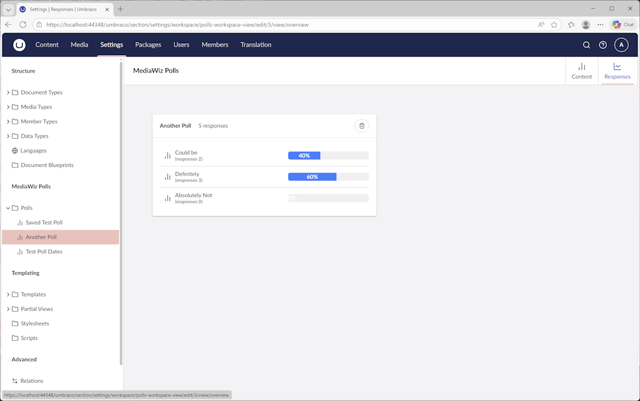
A read‑only view that aggregates voting data for a Poll.
import { UMB_WORKSPACE_CONTEXT } from "@umbraco-cms/backoffice/workspace";
import { UmbTextStyles } from '@umbraco-cms/backoffice/style';
import { css, html, customElement, LitElement, state, repeat } from '@umbraco-cms/backoffice/external/lit';
import { UmbElementMixin } from '@umbraco-cms/backoffice/element-api';
import { POLLS_WORKSPACE_CONTEXT } from "./polls-workspace-context";
import { umbConfirmModal } from '@umbraco-cms/backoffice/modal';
import { PollQuestionService } from "../models/poll-questionservice";

@customElement('polls-responses-view')
export class PollsResponseView extends UmbElementMixin(LitElement) {
    @state()
    text?: string = '';
    pollid?: string | null = '';
    workspaceAlias: string = 'polls-response';
    @state()
    private _poll: any;


    constructor() {
        super();
        this.provideContext(UMB_WORKSPACE_CONTEXT, this);
        this.consumeContext(POLLS_WORKSPACE_CONTEXT, (context) => {
            context?.pollId.subscribe((pollId: string | null | undefined) => {
                this.pollid = pollId;
                //removed requestUpdate from here to avoid multiple render
                //this.requestUpdate();
            });
            this.fetchPolls().then(data => {
                if (!this._poll) {
                    this._poll = data;

                }
            });
        })
    }
    getEntityType(): string {
        return "polls-responses-view";
    }

    private async fetchPolls() {
        const poll = await PollQuestionService.GetOverviewById(Number(this.pollid));
        return Promise.resolve(poll);

    }

    async #handleDelete(u: { target: any }) {
        umbConfirmModal(this, { headline: 'Delete All the Responses',color:'danger', content: 'Are you sure you want to delete?' })
            .then(async () => {
                const dataId = u.target?.dataset?.id;
                let poll = await PollQuestionService.DeleteResponses(dataId);
                if (poll) {
                    return Promise.resolve(poll);
                } else {
                    return Promise.reject(new Error(`No polls found`))
                }

            })
            .catch(() => {
                return Promise.resolve('cancel');
            })
    }

    render() {
        if (!this._poll) {
            return html``;
        }

        return html`
            <umb-body-layout header-transparent header-fit-height>
                <section id="settings-dashboard" class="uui-text">
                    <uui-box headline="${this._poll.name}" >
                        <uui-action-bar slot="header-actions">
                            <uui-button label="Delete" ?disabled=${this._poll.responses.length === 0} look="placeholder" pristine="" @click="${(u: { preventDefault: () => void; target: any; }) => {
                                u.preventDefault();
                                this.#handleDelete(u);
                            }}" ><uui-icon name="delete" data-id="${this._poll.id}"></uui-icon>
                            </uui-button>
                        </uui-action-bar>
                        <span slot="header">
                            ${this._poll.responses.length ?? 'Unknown'} responses
                        </span>
                        <uui-ref-list>
                        ${repeat(this._poll.answers, (item: any) => item.key, (item) =>
                            html`
                                <uui-ref-node name="${item.value}">
                                <uui-icon slot="icon" name="icon-bar-chart"></uui-icon>
                                <uui-label class="progress-bar" role="progressbar" aria - valuenow="${item.percentage}" aria - valuemin="0" aria - valuemax="100">
                                    <div class="progress" style="width:${item.percentage}%"><span class="progress-text">${item.percentage}%</span></div>
                                </uui-label>
                                <uui-label slot="detail">(responses ${item.responses?.length})</uui-label>
                                </uui-ref-node> `
                        )}
                       </uui-ref-list>
                    </uui-box>
                </section>
            </umb-body-layout>`;
    }

    static override styles = [
        UmbTextStyles,
        css`
        :host {
            display: block;
            padding: var(--uui-size-layout-1);
        }
        #settings-dashboard{
            display: grid;
            grid-gap: var(--uui-size-7);
            grid-template-columns: repeat(2, 1fr);
            padding: var(--uui-size-layout-1);
        }
        .progress-bar {
            width: 60%;
            max-width: 200px;
            height: 20px;
            background-color: #f0f0f0;
            border-radius: 5px;
            overflow: hidden;
        }

        .progress {
            height: 100%;
            background-color: #007BFF;
            width: 50%; /* This represents the percentage filled */
        }
        .progress-text {
            color: white;
            text-align: center;
            display: block;
        }
    `,
    ];

}

export default PollsResponseView;

declare global {
    interface HTMLElementTagNameMap {
        'polls-responses-view': PollsResponseView;
    }
}
5. Drag-and-Drop Answer Sorting
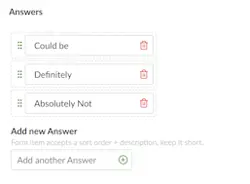 One of the standout features of this Polls UI is the drag‑and‑drop answer ordering, implemented using two custom elements.
5.1 <poll-sorter-item>
File: sorter/sorter-item.ts
Represents a single answer. Key design choices:
Attributes reflect state so the sorter can read them
Hidden inputs ensure form submission works
Styling matches Umbraco’s backoffice look
import { UmbTextStyles } from '@umbraco-cms/backoffice/style';
import { css, html, customElement, LitElement, property } from '@umbraco-cms/backoffice/external/lit';
import { UmbElementMixin } from '@umbraco-cms/backoffice/element-api';

@customElement('poll-sorter-item')
export class PollSorterItem extends UmbElementMixin(LitElement) {

	@property({ type: String, reflect: true })
	id: string = '';
	@property({ type: Number, reflect: true })
	sort!: number;
	@property({ type: String, reflect: true })
	name: string = '';
	@property({ type: Number, reflect: true })
	question!: number;

	@property({ type: Boolean, reflect: true, attribute: 'drag-placeholder' })
	umbDragPlaceholder = false;

	override render() {
		return html`
			<div>
			<slot></slot>
			<slot name="action"></slot>
			<uui-input style="display:none;" id="sort_${this.id}" pristine="" name="answerssort" type="number" label="label" value="${this.sort}" min="0" max="100" ></uui-input>
            <uui-input style="display:none;" id="id_${this.id}" name="answersid" type="text" label="Id" pristine="" value="${this.id}" ></uui-input>
            <uui-input style="display:none;" id="question_${this.id}" name="questionid" type="text" label="QuestionId" pristine="" value="${this.question}" ></uui-input>
			</div>
		`;
	}

	static override styles = [
		UmbTextStyles,
		css`
			:host {
				display: block;
				padding:.25rem;
				border: 1px dashed var(--uui-color-border);
				border-radius: var(--uui-border-radius);
				margin-bottom: 3px;
				--uui-icon-color:green;
			}
			:host ([action]){
				margin:10px;

			}
			:host([drag-placeholder]) {
				opacity: 0.2;
			}

			div {
				display: flex;
				align-items: center;
				justify-content: space-between;
			}
			::slotted(*) {
			  padding-left: .1rem;
			}
			::slotted([slot="action"]) {
			  padding-left: .3rem;
			  cursor: pointer;
			  --uui-icon-color:red;
			}
			slot:not([name]) {
				padding:.3rem;
				cursor: grab;
			}
		`,
	];
}

export default PollSorterItem;

declare global {
	interface HTMLElementTagNameMap {
		'poll-sorter-item': PollSorterItem;
	}
}
5.2 <polls-sorter-group>
File: sorter/sorter-group.ts
This component manages:
drag events
ordering logic
stable identifiers
form association
It uses UmbSorterController under the hood — the same system Umbraco uses internally.
import type { PollSorterItem } from './sorter-item.js';
import { UmbTextStyles } from '@umbraco-cms/backoffice/style';
import { css, html, customElement, LitElement, repeat, property, query, state } from '@umbraco-cms/backoffice/external/lit';
import { UmbElementMixin } from '@umbraco-cms/backoffice/element-api';
import { UmbSorterController } from '@umbraco-cms/backoffice/sorter';
import { umbConfirmModal } from '@umbraco-cms/backoffice/modal';
import { UmbValidationContext } from '@umbraco-cms/backoffice/validation';

export type AnswerEntryType = {
	sortid: string;
	id: string;
	name: string;
	sort: number;
	question: number;
};

@customElement('polls-sorter-group')
export class PollsSorterGroup extends UmbElementMixin(LitElement) {
	// Make this element form-associated
	static formAssociated = true;
	@state()
	private _errorMsg: string = '';
	private _items?: AnswerEntryType[];
	private _internals?: ElementInternals;
	private _form?: HTMLFormElement;

	@property({ type: Array, attribute: false })
	public get items(): AnswerEntryType[] {
		return this._items ?? [];
	}
	public set items(value: AnswerEntryType[]) {
		// Only set initial model
		if (this._items !== undefined) return;
		this._items = value;
		// Defer sorter initialization until elements are in the DOM
		this.updateComplete.then(() => {
			this.#sorter.setModel(this._items!);
			this.#updateFormValue();
		});
	}

	@query('#new-answer') newValueInp!: HTMLInputElement;
	@query('#question-id') questionId!: HTMLInputElement;

	#validation = new UmbValidationContext(this);

	constructor() {
		super();
		// Attach internals if supported
		try {
			if ('attachInternals' in HTMLElement.prototype) {
				this._internals = this.attachInternals();
			}
		} catch {
			// ignore
		}
	}

	connectedCallback(): void {
		super.connectedCallback();
		// Fallback: hook the closest form's formdata event if ElementInternals not available
		if (!this._internals) {
			this._form = this.closest('form') ?? undefined;
			this._form?.addEventListener('formdata', this.#onFormData);
		}
	}

	disconnectedCallback(): void {
		// Clean up fallback listener
		this._form?.removeEventListener('formdata', this.#onFormData);
		super.disconnectedCallback();
	}

	// Called when form is reset
	formResetCallback() {
		// No-op, but if you keep initial items elsewhere, restore here and update form value
		this.#updateFormValue();
	}

	// Custom validity (prevent empty list)
	#validate() {
        console.log('Validating sorter group');
		this.#validation.validate().then(() => {
			console.log('Valid');
		}, () => {
			console.log('Invalid');
		});

		if (!this._internals) return;
		const valid = !!this._items && this._items.length > 0 && this._items.every((i) => i.name.trim().length > 0);
		if (!valid) {
			this._errorMsg = 'Please add at least one answer';
			this._internals.setValidity({ customError: true }, this._errorMsg);
		} else {
			this._errorMsg = '';
			this._internals.setValidity({});
		}
	}

	// Contribute fields to parent form
	#updateFormValue() {
		// Keep validity in sync
		this.#validate();

		// Build a FormData payload with repeated keys
		const fd = new FormData();
		(this._items ?? []).forEach((item) => {
			fd.append('Answers', item.name);
			fd.append('answerssort', String(item.sort));
			fd.append('answersid', item.id);
		});

		if (this._internals) {
			// ElementInternals can submit multiple fields via FormData
			this._internals.setFormValue(fd);
		}
		// Fallback path handled in #onFormData
	}

	// Fallback: append our data to the FormData right before submission
	#onFormData = (e: FormDataEvent) => {
		(this._items ?? []).forEach((item) => {
			e.formData.append('Answers', item.name);
			e.formData.append('answerssort', String(item.sort));
			e.formData.append('answersid', item.id);
		});
	};

	// Ensure sorter is initialized whenever items change after renders
	protected override updated(changed: Map<string, unknown>) {
		super.updated(changed);
		if (changed.has('items')) {
			// Elements exist now; refresh mapping
			this.#sorter.setModel(this._items ?? []);
		}
	}

	// Sorter: use stable ids for element and model
	#sorter = new UmbSorterController<AnswerEntryType, PollSorterItem>(this, {
		getUniqueOfElement: (element) => element.getAttribute('sortid') ?? '', // read reflected attribute
		getUniqueOfModel: (modelEntry) => String(modelEntry.sortid),            // ensure string
		identifier: 'mediawiz-polls-sorters',
		itemSelector: 'poll-sorter-item',
		containerSelector: '.sorter-container',
		onChange: ({ model }) => {
			const oldValue = this._items;
			model.forEach((row, index) => (row.sort = index));
			this._items = model;
			this.requestUpdate('items', oldValue);
			this.#updateFormValue();
		},
	});

	#removeItem = (item: AnswerEntryType) => {
		umbConfirmModal(this, { headline: 'Delete Answer', color: 'danger', content: 'Are you sure you want to delete?' })
			.then( () => {
				const oldValue = this._items;
				this._items = this._items!.filter((r) => r.sortid !== item.sortid);
				this.requestUpdate('items', oldValue);
				// After render, refresh sorter mapping
				this.updateComplete.then(() => this.#sorter.setModel(this._items!));
				this.#updateFormValue();
			})
			.catch(() => {
				console.log("User has rejected");
			})
	};

	#addItem() {
		const newVal = this.newValueInp.value.trim();
		if (!newVal) {
			if (!this._internals) return;
			this._errorMsg = 'Please enter an answer';
			this._internals.setValidity({ customError: true }, this._errorMsg);
			return;
		};
		this._errorMsg = ''; this._internals?.setValidity({});
		const qId = this.questionId.value;
		const newId = crypto?.randomUUID ? crypto.randomUUID() : `${Date.now()}_${Math.random()}`;
		const oldValue = this._items;
		this._items = [...(this._items ?? []), { sortid: newId, id: "0", name: newVal, sort: 9, question: Number(qId) }];
		this._items.forEach((row, index) => (row.sort = index));
		this.newValueInp.value = '';
		this.requestUpdate('items', oldValue);
		// Refresh sorter after DOM updates so elements exist
		this.updateComplete.then(() => this.#sorter.setModel(this._items!));
		this.#updateFormValue();
	}

	override render() {
		if (!this.items) {
			return html`
				<uui-form-layout-item>
					<p>No Answers defined</p>
				</uui-form-layout-item>
			`;
		}
		return html`
			<div class="sorter-container">
				${repeat(
					this.items,
					(item) => item.id, // key by id
					(item) => html`
						<poll-sorter-item style="width: fit-content;" sortid=${item.sortid} name=${item.name} id=${item.id} sort=${item.sort} question="${item.question}">
							<uui-icon name="icon-grip" class="handle" aria-hidden="true"></uui-icon>
							<uui-input
							  slot="action"
							  id="${item.sortid}"
							  name="Answers"
							  type="text"
							  label="Answer"
							  pristine=""
							  .value=${item.name}
							  @input=${(e: InputEvent) => {
								const target = e.target as HTMLInputElement;
								const oldValue = this._items;
								// immutable update so Lit re-renders and keeps ids stable
								this._items = this.items.map(i => i.sortid === item.sortid ? { ...i, name: target.value } : i);
								this.requestUpdate('items', oldValue);
								this.updateComplete.then(() => this.#sorter.setModel(this._items!));
								this.#updateFormValue();
							  }}>
							  <div slot="append" style="padding-left:var(--uui-size-2, 6px)">
								<uui-icon-registry-essential>
									<uui-icon color="red" data-id="${item.sortid}" title="Remove Answer" name="delete" @click=${() => this.#removeItem(item)}></uui-icon>
								</uui-icon-registry-essential>
							  </div>
							</uui-input>
						</poll-sorter-item>
					`,
				)}
			</div>
			<uui-form-layout-item id="new-answer-item">
				<uui-label slot="label">Add new Answer</uui-label>
				<span slot="description">Form item accepts a description, keep it short.</span>
				<uui-input style="display:none;" id="question-id" name="Question" type="text" pristine value="${this.items[0]?.question ?? ''}"></uui-input>
				<uui-input id="new-answer" name="Answers" type="text" pristine value="" placeholder="Add another Answer">
					<div slot="append">
						<uui-icon name="icon-badge-add" @click=${() => this.#addItem()}></uui-icon>
					</div>
				</uui-input>
			</uui-form-layout-item>
			${this._errorMsg
				? html`<uui-form-validation-message for="new-answer-item" styles="color:red">${this._errorMsg}</uui-form-validation-message>`
				: null}
			`;
	}

	static override styles = [
		UmbTextStyles,
		css`
			:host {
				display: block;
				width: max-content;
				border-radius: calc(var(--uui-border-radius) * 2);
				padding: var(--uui-size-space-1);
				--uui-icon-color:green;--uui-icon-cursor: pointer;
			}
			.sorter-placeholder {
				opacity: 0.2;
			}
			.sorter-container {
				min-height: 20px;
			}

		`,

	];
}

export default PollsSorterGroup;

declare global {
	interface HTMLElementTagNameMap {
		'polls-sorter-group': PollsSorterGroup;
	}
}
6. Poll Property Picker
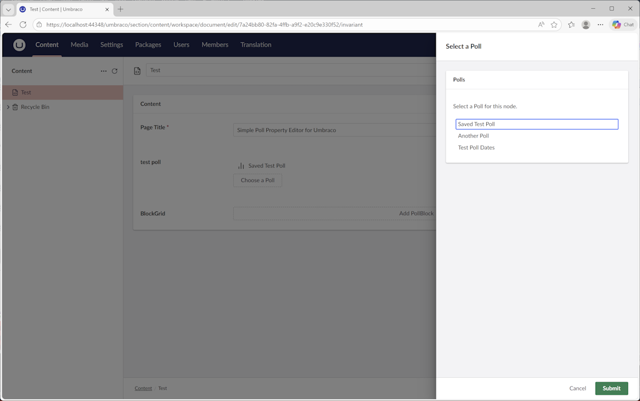
To allow editors to embed polls within content, you implement a custom property editor consisting of:
A UI component
A modal dialog
A list of available polls
This makes the Polls feature usable in BlockGrid, Nested Content, and other editor types.
Files:
picker/manifest.tspicker/poll-picker.tspicker/poll-picker-modal.ts
//picker/manifest.ts

const pollPicker: UmbExtensionManifest = {
    type: 'propertyEditorUi',
    alias: 'Umbraco.Community.Polls',
    name: 'Poll Picker Property Editor UI',
    js: () => import("../picker/poll-picker.js"),
    "elementName": "mediawiz-poll-picker",
    meta: {
        label: 'Poll Picker',
        propertyEditorSchemaAlias: 'Umbraco.Plain.Json',
        icon: 'icon-bar-chart',
        group: 'pickers',
        supportsReadOnly: true
    }
}
const pickerModalManifest: UmbExtensionManifest = {
    type: 'modal',
    alias: 'Poll.Modal',
    name: 'Poll Modal',
    element: () => import('./poll-picker-modal.js')
}

export const manifests: Array<UmbExtensionManifest> = [
    pollPicker,
    pickerModalManifest,
];
//picker/poll-picker.ts
import { html, customElement, state, property } from "@umbraco-cms/backoffice/external/lit";
import type { UmbPropertyEditorUiElement } from "@umbraco-cms/backoffice/property-editor";
import { UmbLitElement } from '@umbraco-cms/backoffice/lit-element';
import { POLL_MODAL_TOKEN } from "./poll-modal.token.js";
import { umbConfirmModal, umbOpenModal } from "@umbraco-cms/backoffice/modal";
import { UmbChangeEvent } from "@umbraco-cms/backoffice/event";
import type { PollQuestion } from "../models/poll-question.js";
type ArrayOf<T> = T[];
@customElement("mediawiz-poll-picker")
export class PollPicker extends UmbLitElement implements UmbPropertyEditorUiElement {
@property()
public value: ArrayOf<PollQuestion> = [];
@state()
_items: ArrayOf<PollQuestion> = [];
// do I need this?
connectedCallback() {
super.connectedCallback();
}
#updatePropertyEditorValue() {
this.value = this._items;
this.dispatchEvent(new UmbChangeEvent())
}
render() {
return html`
<uui-ref-list>
<uui-ref-node name="${this.value == null ? "No Poll Selected" : this.value[0]?.name}">
<uui-icon slot="icon" name="icon-bar-chart"></uui-icon>
<uui-action-bar slot="actions"><uui-button label="delete" @click=${this.handleDelete}><uui-icon name="delete"></uui-icon></uui-button></uui-action-bar>
</uui-ref-node>
</uui-ref-list>
<uui-button @click=${this._openModal} id="btn-add" look="placeholder" pristine="" label="Choose a Poll" type="button" color="default"></uui-button>
`;
}
handleDelete() {
umbConfirmModal(this, { headline: 'Remove Poll', color: 'danger', content: 'Are you sure you?' })
.then(async () => {
this._items = [];
this.#updatePropertyEditorValue();
})
.catch(() => {
return false;
})
}
/**
* Open Modal (Poll Picker)
* @param id
*/
async _openModal() {
const returnedValue =
await umbOpenModal(this, POLL_MODAL_TOKEN, {
data: {
headline: "Select a Poll",
},
}).catch(() => undefined);
this._items = [returnedValue!.poll];
this.#updatePropertyEditorValue();
}
}
export {
PollPicker as default
};
declare global {
interface HTMLElementTagNameMap {
'mediawiz-poll-picker': PollPicker;
}
}//picker/poll-picker-modal.ts
import { customElement, html, property,state } from '@umbraco-cms/backoffice/external/lit';
import { UmbLitElement } from '@umbraco-cms/backoffice/lit-element';
import type { UmbModalExtensionElement } from '@umbraco-cms/backoffice/modal';
import type { UmbModalContext } from '@umbraco-cms/backoffice/modal';
import type { PollModalData, PollModalValue } from './poll-modal.token.js';
import type { PollQuestion } from "../models/poll-question.js";
import { PollQuestionService } from '../models/poll-questionservice.js';
@customElement('poll-dialog')
export class PollDialogElement
extends UmbLitElement
implements UmbModalExtensionElement<PollModalData, PollModalValue> {
@state()
text?: string = '';
@state()
_options: PollQuestion[] = [];
@property({ attribute: false })
modalContext?: UmbModalContext<PollModalData, PollModalValue>;
@property({ attribute: false })
data?: PollModalData;
connectedCallback() {
super.connectedCallback();
this._fetchData();
}
private _fetchData = async () => {
const response = await this.fetchPolls();
this._options = [...response];
};
private _onChange(e: CustomEvent) {
const controlValue = e.target as HTMLSelectElement;
// Find the selected poll by id
const selectedPoll = this._options.find((a: any) => a.id === Number(controlValue.value));
// Only update if a poll is found
if (selectedPoll) {
this.modalContext?.updateValue({ poll: selectedPoll });
}
}
private _handleCancel() {
this.modalContext?.submit();
}
private _handleSubmit() {
//this.modalContext?.updateValue({ myData: 'hello world' });
this.modalContext?.submit();
}
private async fetchPolls() {
const poll = await PollQuestionService.GetOverview();
if (poll) {
return Promise.resolve(poll);
} else {
return Promise.reject(new Error(`No polls found`))
}
}
render() {
return html`
<umb-body-layout headline="${this.modalContext?.data.headline ?? "Default headline"}" headline-variant="h5">
<uui-box headline="Polls">
<p>Select a Poll for this node.</p>
<uui-combobox-list >
${this._options.map(
option =>
html`<uui-combobox-list-option value="${option.id}" @click="${this._onChange}"
>${option.name}</uui-combobox-list-option>`
)}
</uui-combobox-list>
</uui-box>
<div slot="actions">
<uui-button @click=${this._handleCancel}>Cancel</uui-button>
<uui-button @click=${this._handleSubmit} color="positive" look="primary">Submit</uui-button>
</div>
</umb-body-layout>
`;
}
}
export const element = PollDialogElement;//picker/poll-modal-token.ts
import { UmbModalToken } from '@umbraco-cms/backoffice/modal';
import type { PollQuestion } from "../models/poll-question.js";
export type PollModalData = {
headline: string;
}
export type PollModalValue = {
poll: PollQuestion;
}
export const POLL_MODAL_TOKEN = new UmbModalToken<PollModalData, PollModalValue>('Poll.Modal', {
modal: {
type: 'sidebar',
size: 'small'
}
});7. API Client
File: polls-questionservice.ts
A thin TypeScript wrapper around your backend endpoints. It keeps your views clean by abstracting away HTTP details.
Expected methods include:
GetPolls()
GetPollById()
GetOverView()
GetOverviewById()
Delete()
DeleteResponses()
The backend itself is out of scope for this article, but the UI assumes a minimal API exists.
8. Public Facing UI
To render polls on the website, the implementation uses:
a ViewComponent for the voting UI
a BlockGrid template for embedding polls in content
This keeps the front‑end clean, reusable, and consistent with Umbraco’s block‑based editing experience.
Examples using the provided Viewcomponents.
Standard Implementation which uses Html.BeginUmbracoForm to do the voting
@await Component.InvokeAsync("Polls", Model.MyPoll)Implementation which uses standard html form to use an ajax post
@await Component.InvokeAsync("Polls", new {Model=Model.MyPoll,Template="Ajax"})The Ajax Template uses a standard form (non Umbraco) it was added to allow the use of an ajax post to prevent page scrolling after voting. To accomplish this you will need to implement an ajax post when the vote button is clicked, example below. You will need to wrap the viewcomponent call in a wrapper div with an id so it can be replaced by the javascript.
    <script
        src="https://code.jquery.com/jquery-3.7.1.min.js"
        integrity="sha256-/JqT3SQfawRcv/BIHPThkBvs0OEvtFFmqPF/lYI/Cxo="
        crossorigin="anonymous"></script>
    <script>
        $(document).on('click', '#vote-btn', function (e) {
            e.preventDefault(); // avoid to execute the actual submit of the form.

            var form = $('#poll-vote');

            $.ajax({
                type: "GET",
                url: "umbraco/surface/pollsurface/vote",
                data: form.serialize(), // serializes the form's elements.
                success: function (data) {
                    console.log("return: " + data);
                    $('#poll-container').html(data); // update the polls parent container with the results
                    $('.card-footer').focus();
                }
            });
        });
    </script>
BlockGrid
The Poll package also includes a template to render a Poll in the BlockGrid. To use it you will need to:
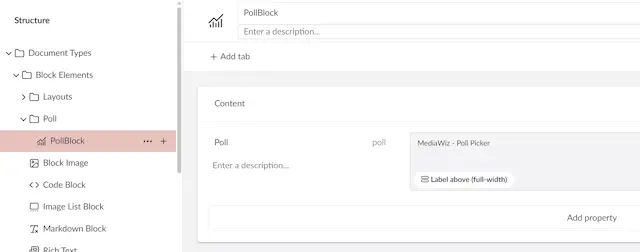
Create an Element Type called "PollBlock"
Add a Poll propery Picker called "Poll" to the Element Type
Add the new PollBlock Element to your existing BlockGrid DataType
9. Wrapping Up
You now have a complete, idiomatic Polls implementation for Umbraco 17 that demonstrates:
proper use of workspaces and views
advanced custom elements with drag‑and‑drop
clean separation of concerns
modern backoffice extension patterns
This architecture scales well and can be extended with features like:
role‑based permissions
exporting results
real‑time updates
analytics dashboards
It’s a great foundation for building more ambitious tools in the new backoffice.